
 EN
EN
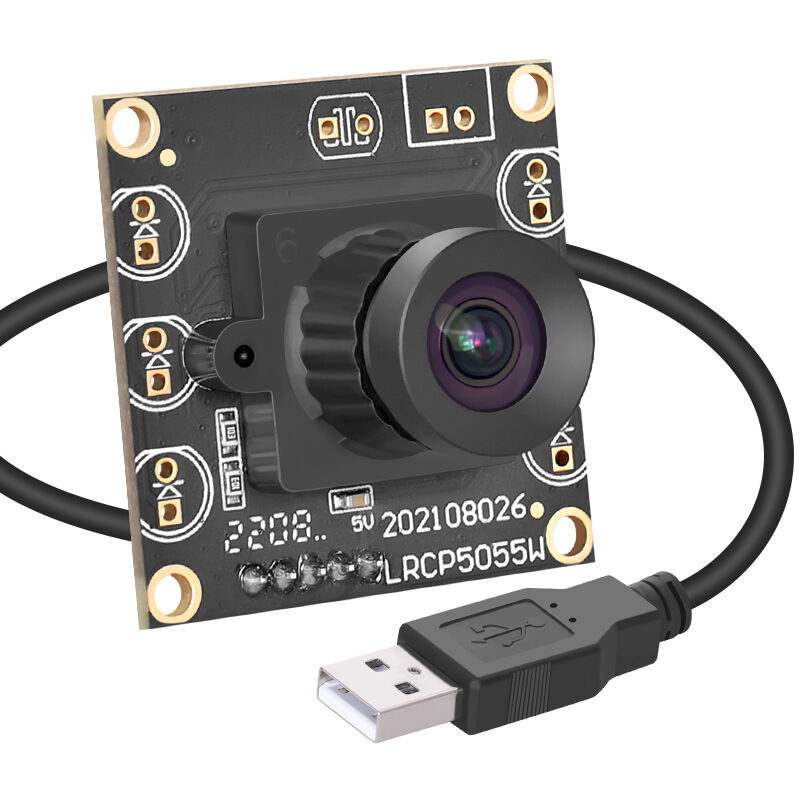
Why Mini USB Cameras Are Critical for Robotics Vision Systems
Key advantages: size, power efficiency, and plug-and-play integration in constrained robotic platforms
Mini USB cameras deliver critical advantages for robotic vision through their compact form factor and sub-2W power consumption—ideal for battery-powered systems like mobile drones and collaborative robotic arms. Their plug-and-play compatibility with Linux and Windows eliminates complex driver installation, accelerating development and field deployment. Standardized USB interfaces simplify wiring and maintain sufficient bandwidth for real-time video streaming (up to 4K at 30fps), making them uniquely suited for space- and power-constrained platforms where traditional industrial cameras are impractical.
Use-case alignment: inspection, navigation, manipulation, and human-robot interaction
These cameras support all four foundational robotics vision functions:
- Inspection: Detecting sub-millimeter defects on manufacturing lines using 1080p–4K resolution and consistent color fidelity
- Navigation: Enabling real-time SLAM and obstacle avoidance via low-latency stereo or wide-FOV feeds
- Manipulation: Guiding precision grasping in pick-and-place tasks with <15ms end-to-end latency
- Human-robot interaction: Supporting responsive gesture recognition and facial tracking at 30–60fps
This versatility stems from their balanced performance envelope—offering resolutions from 720p to 4K, frame rates up to 60fps, and hardware-accelerated compression (MJPEG/H.264)—while imposing minimal computational overhead. That efficiency preserves CPU/GPU resources for AI inference and closed-loop control logic.
Minimizing Latency and Jitter for Real-Time Robotic Control
Measuring and reducing end-to-end vision pipeline delay—from exposure to actuation
For high-speed robotic control—such as welding, bin-picking, or agile drone maneuvering—end-to-end vision latency must remain under 20ms to sustain stable closed-loop performance. Industrial testing confirms that default configurations often exceed this threshold, but targeted optimizations yield dramatic improvements:
- Sensor readout tuning: Aligning rolling shutter timing with robot motion profiles reduces motion blur and temporal misalignment
- On-camera compression: Hardware-encoded MJPEG or H.264 cuts USB transfer load by 60–80% without introducing software encoding delays
- Zero-copy memory mapping: Direct GPU buffer access bypasses CPU memory copies, cutting image ingestion latency by up to 12ms
Proper pipeline tuning consistently reduces total vision-to-actuation delay by 40–60%, enabling reliable real-time perception even on edge-class compute modules.
USB 3.0 determinism debate: practical benchmarks for closed-loop vision servoing
While USB 3.0’s 5Gbps theoretical bandwidth supports multiple high-res streams, its non-deterministic scheduling can introduce jitter detrimental to servo control. Real-world stress tests under industrial vibration and thermal load reveal measurable trade-offs:
| Condition | Average Latency | Jitter (σ) |
|---|---|---|
| Single camera (ISO mode) | 8.2ms | ±0.8ms |
| Multi-camera setup | 22.7ms | ±4.1ms |
| With USB autosuspend enabled | 34–210ms | Unpredictable |
Reliable vision servoing is achievable through three proven mitigation strategies:
- Using isochronous transfers, which reserve dedicated USB bandwidth (e.g., 80% for vision) to guarantee timing consistency
- Applying kernel-level tuning, including disabling USB autosuspend and elevating URB (USB Request Block) priority
- Implementing firmware co-design, synchronizing exposure timing across cameras via hardware triggers
Field deployments in automotive assembly cells confirm that these measures reduce jitter to ≤1ms—meeting the timing requirements for >90% of vision-guided servoing applications.
Scaling Multi-Camera Setups: Bandwidth, Topology, and Embedded Hub Design
Optimizing concurrent streams: FPS, resolution, and compression trade-offs across mini USB cameras
Scaling beyond a single mini USB camera demands disciplined bandwidth management. A 1080p/60fps stream consumes ~1.5 Gbps raw; two such streams would saturate USB 3.0 before accounting for protocol overhead, error correction, or synchronization signals. Empirical testing shows optimal trade-offs include:
- Using 720p at 30fps with H.264 encoding for dual-camera setups—consuming just 45% of USB 3.0 bandwidth while maintaining sub-100ms latency
- Reserving higher FPS/resolution only for primary task-critical cameras (e.g., end-effector guidance), while downgrading auxiliary views (e.g., safety monitoring) to 480p/15fps
- Avoiding MJPEG for latency-sensitive paths—its lower compression ratio increases transfer time, adding 10–25ms per frame
Always preserve ≥30% bandwidth headroom to accommodate transient spikes, clock drift compensation, and fail-safe handshaking in dynamic robotic environments.
Industrial-grade USB hub selection and cabling strategies for vibration-resistant robot arms
Consumer USB hubs fail catastrophically in robotic arms due to micro-disconnections caused by vibration, thermal cycling, and mechanical flex. Reliable multi-camera operation requires purpose-built infrastructure:
- IP67-rated industrial hubs with locking USB-C or Micro-B connectors and 50G shock resistance ratings
- Active voltage regulation, maintaining ±5% 5V stability during motor-induced load spikes
- Dual-layer shielded cabling, featuring braided + foil shielding and spring-loaded strain relief at both ends
For articulated arms exceeding 0.5m reach—or environments with high EMI (e.g., near welding cells)—optical fiber USB extenders eliminate interference while extending range up to 100m. Validation requires vibration testing at 150% of operational amplitude and frequency to ensure signal integrity under worst-case conditions.
Driver and Firmware Tuning for Reliable Robotic Perception
V4L2 low-latency configuration, zero-copy buffers, and disabling USB autosuspend
Driver-level tuning is essential to unlock the full real-time potential of mini USB cameras in robotics. Video4Linux2 (V4L2) low-latency mode bypasses kernel queuing and unnecessary format conversions, trimming 5–8ms from the capture-to-application path—critical for collision-avoidance response windows under 100ms. Coupling this with zero-copy DMA buffers, which map camera memory directly into GPU-accessible address space, eliminates redundant CPU-side copying and saves 15–30% of core cycles during continuous streaming. Finally, disabling USB autosuspend prevents disruptive 200–500ms recovery delays when the host OS attempts to power-down idle ports—a common cause of dropped frames during intermittent motion pauses. Together, these settings enable sustained 30+ FPS operation on resource-constrained edge devices, ensuring uninterrupted visual perception throughout extended inspection or manipulation cycles.
FAQs About Mini USB Cameras for Robotics
What makes mini USB cameras suitable for robotics?
Mini USB cameras are compact and power-efficient, making them ideal for space-constrained and battery-powered robotic platforms. They also offer plug-and-play integration, supporting quick deployment.
How do these cameras support different robotic functions?
They enable key robotic vision functions such as inspection with high resolution, navigation using low-latency feeds, manipulation with precise tracking, and human-robot interaction through gesture and facial recognition.
How can latency be minimized in robotic control?
Latency can be reduced by optimizing sensor readout, using hardware compression, and employing zero-copy memory mapping which cuts down the processing delay significantly.
What are the challenges in multi-camera setups?
Challenges include bandwidth management, handling increased latency, and ensuring synchronized operation. Solutions involve careful trade-offs in stream resolution and frame rates along with robust hardware infrastructure.
What are the benefits of driver and firmware tuning?
Tuning drivers and firmware helps optimize real-time camera performance, reducing latency and preventing disruptions such as dropped frames due to power-saving features of the OS.
Table of Contents
- Why Mini USB Cameras Are Critical for Robotics Vision Systems
- Minimizing Latency and Jitter for Real-Time Robotic Control
- Scaling Multi-Camera Setups: Bandwidth, Topology, and Embedded Hub Design
-
Driver and Firmware Tuning for Reliable Robotic Perception
- V4L2 low-latency configuration, zero-copy buffers, and disabling USB autosuspend
- FAQs About Mini USB Cameras for Robotics
- What makes mini USB cameras suitable for robotics?
- How do these cameras support different robotic functions?
- How can latency be minimized in robotic control?
- What are the challenges in multi-camera setups?
- What are the benefits of driver and firmware tuning?