
 EN
EN
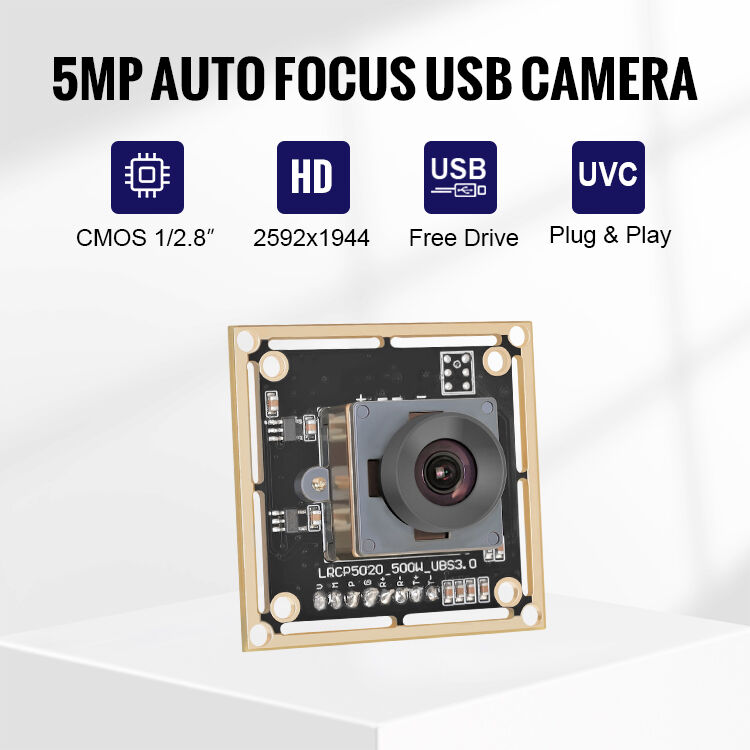
Why M12 Lens Maintenance Is Critical for USB Camera Performance
The M12 lens acts as the main entry point for capturing images in USB cameras, and here's the thing - even tiny amounts of dirt or damage can lead to major problems down the road. Think about it: dust particles around 10 microns in size (those are really hard to see without magnification) actually scatter light and cut image contrast by nearly a third in machine vision setups. What happens over time? Finger oils build up on lenses and start eating away at protective coatings, which means the picture quality just keeps getting worse until it's permanently damaged. Industrial environments pose another challenge too. Vibration gradually loosens those lens mounts by somewhere between 0.05 and 0.1 mm after about half a year, causing focus issues that throw off all the carefully set calibration settings. Regular cleaning and maintenance isn't just good practice, it's essential for keeping systems running properly. Without proper care, we're looking at blurry images at best and complete shutdowns when particles get inside and mess with sensors during important production runs.
Safe and Effective Cleaning Techniques for M12 Lens for USB Camera
Step-by-Step Optical Hygiene Protocol: Dry First, Then Wet
Start by blowing off any loose stuff with compressed air, making sure not to actually touch the lens itself. Keep the can straight up, hold it about four to six inches back, and give quick one second blasts. Then take a dry microfiber cloth that doesn't leave lint behind and gently wipe the lens in circles starting from the middle working outwards toward the edges. If there are stubborn smudges hanging around, put just a tiny bit of 99% isopropyl alcohol on the cloth first before touching the lens surface. Never spray anything directly onto the glass since this could ruin those delicate protective coatings. The whole point of doing dry cleaning first is to stop scratches and keep liquids from getting into sensitive parts inside the device. After that messiness, do another quick dry wipe across everything to get rid of any remaining streaks. And remember folks, try to clean these things when dust isn't flying everywhere because otherwise all that effort goes right down the drain again within minutes.
Tool Selection Guide: Microfiber Cloths, Compressed Air, and 99% Isopropyl Alcohol
| Tool | Purpose | Usage Tip |
|---|---|---|
| Compressed Air | Removes loose dust/debris | Use short bursts; hold upright to prevent moisture release |
| Microfiber Cloth | Dry wiping & solution application | Opt for lint-free variants; replace when soiled or contaminated |
| 99% Isopropyl Alcohol | Dissolves oils/residues | Apply sparingly to cloth; avoid lower-concentration solutions or household cleaners containing ammonia or abrasives |
Dedicated tools prevent cross-contamination. Store microfiber cloths sealed and oil-free. The 99% alcohol concentration ensures rapid evaporation without water residue—critical for preserving anti-reflective and hydrophobic lens coatings.
Preventing Damage and Contamination During Handling and Integration
Taking care of those M12 lens USB cameras when handling them physically or integrating into systems helps avoid damage that can ruin image quality forever. Dust particles and finger smudges really mess with how clear things look through the lens. And if someone mounts the camera wrong, it puts stress on the mechanical parts which can throw off the alignment of the lens components. Then there's ESD to worry about too. Static electricity might not seem like much but it can actually fry the delicate CMOS circuits inside without anyone even noticing until images start looking bad. For industrial applications where reliability matters most, following basic protection steps makes all the difference in keeping these cameras working properly over time.
Mount Integrity, Lens Cap Discipline, and ESD-Safe Assembly Practices
Mount Integrity: Always follow manufacturer torque specifications during installation. Over-tightening distorts the lens barrel and causes focus drift; under-tightening invites vibration-induced loosening. Use alignment pins to prevent cross-threading, and inspect mounts monthly for stress fractures using magnification tools.
Lens Cap Discipline: Replace protective caps immediately after cleaning or inspection. In high-particulate environments such as manufacturing floors, caps reduce dust accumulation by 78% compared to uncovered lenses (Optical Engineering Journal, 2023). Store spare cameras in sealed containers with desiccant packs to control humidity.
For ESD safe assembly work, always set up shop in properly grounded spaces with those anti-static mats laid out and wrist straps ready to go. When dealing with cameras, stick strictly to holding them by the edges only please! Touching those connectors or circuit boards is asking for trouble. Before putting anything together, make sure everything gets discharged first. Believe it or not, even small electrostatic discharges under 100 volts can wreck havoc on those sensitive CMOS sensors according to research published by the Electrostatic Society back in 2023. And don't forget about controlling the environment too. Keeping assembly rooms between 40 and 60 percent relative humidity helps keep that pesky static at bay naturally.
| Risk Factor | Prevention Measure | Impact Reduction |
|---|---|---|
| Physical Impact | Foam-lined storage; no direct handling | 90% fewer mount fractures |
| Dust Contamination | Sealed storage; HEPA-filtered workstations | 85% cleaner optics |
| ESD Damage | Ionizing fans; conductive flooring | 95% fewer failures |
Establishing a Sustainable Maintenance Schedule for Industrial USB Cameras
Industrial environments accelerate wear on critical components like the M12 lens, making proactive maintenance essential. Unlike reactive repairs, a scheduled approach prevents cumulative damage from dust infiltration, moisture corrosion, and mechanical stress. Studies show unmaintained industrial imaging systems experience 40% faster performance degradation in high-particulate settings.
Environmental Factors: Dust, Humidity, and Vibration Impact on M12 Lens Longevity
Three key environmental stressors dictate maintenance frequency:
- Dust/Contaminants: Microscopic particles scratch lens coatings and accumulate on sensors. Facilities with airborne debris require bi-weekly inspections.
- Humidity: Condensation inside housings promotes fungal growth and circuit corrosion. Maintain relative humidity below 60% and perform monthly seal checks.
- Vibration: Constant shaking loosens lens mounts and misaligns optics. Quarterly torque verification is critical near heavy machinery.
Implementing a tiered schedule based on your facility’s specific risk profile extends functional lifespan by 2–3 years while ensuring consistent image quality.
FAQ Section
Why is M12 lens maintenance critical for USB cameras?
The M12 lens serves as the primary entry for image capturing, and even minor dirt or damage can severely impact performance by reducing image contrast and causing focus issues over time.
What are the best cleaning techniques for M12 lenses?
The best practices involve first using compressed air, then gently wiping with a microfiber cloth, and optionally using 99% isopropyl alcohol for stubborn smudges. Avoid direct application of liquids on the lens to protect coatings.
How can I prevent damage during camera handling?
By adhering to proper handling and integration protocols, such as ensuring mount integrity, using lens caps immediately after use, and managing electrostatic discharge (ESD) risks.
What factors influence the maintenance schedule of M12 lenses?
Environmental factors such as dust, humidity, and vibration dictate maintenance frequency in industrial settings. Regular inspections and proactive measures are recommended based on specific risk profiles.