
 EN
EN
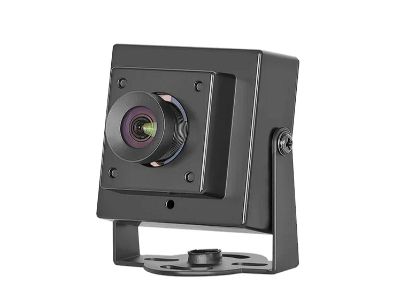
USB infrared camera modules are small devices that can capture images and videos using heat instead of regular light. This technology is really useful in many fields, like security, research, and even in homes. At Zhongweiaoke, we believe that understanding how to use these camera modules can help many people. They are not just for experts; even beginners can use them with some simple steps. The key is knowing how to set them up and what to look out for. With the right guidance, anyone can make the most of these amazing tools, turning simple observations into valuable insights.
What Wholesale Buyers Need to Know
When buying USB infrared camera modules in bulk, buyers should pay attention to a few important things. First, it’s crucial to check the quality of the cameras. Not all infrared cameras are made the same. Some may have better resolution and features than others. Buyers should ask about the specifications, like the resolution in megapixels and the range of temperatures the camera can detect. Another thing to consider is the compatibility with different systems. Will the camera work well with existing software? This can save a lot of time and trouble later. Also, think about the warranty. A good warranty can protect your investment. If something goes wrong, you want to be sure you can get help. Price is another factor. While it might be tempting to choose the cheapest option, sometimes paying a bit more can lead to better performance and durability in the long run. Lastly, consider customer support. What happens if you have questions after the purchase? Good support can make a big difference. It’s worth taking the time to research and ask questions before making a large order. This can help ensure that you get the best value and performance for your needs.
Common Usage Issues with USB Infrared Camera Modules and How to Solve Them
Using USB infrared camera modules can sometimes lead to problems, but most issues can be fixed with a little know-how. One common problem is connection issues. Sometimes, the camera may not connect to the computer. This can happen if the USB port is damaged or if drivers are not installed correctly. To solve this, make sure to use a different USB port and check if the camera needs specific drivers. Another issue is poor image quality. If the images appear blurry or unclear, it may be due to incorrect settings. Check the focus and adjust the settings for brightness and contrast. It’s also important to ensure that the camera’s lens is clean. Dust or smudges can affect how clear the images are. Additionally, users may face problems with temperature readings. If the camera is not giving accurate readings, it might need calibration. Check the manual for instructions on how to calibrate the device properly. Lastly, some users find it hard to interpret the images captured by the camera. Learning how to read thermal images takes practice. There are many resources online that explain how to analyze these images, and taking the time to learn can greatly enhance the use of the camera. By being aware of these common issues and knowing how to troubleshoot them, users can make their experience with USB camera much smoother and more productive.
How to Optimize the Performance of USB Infrared Camera Modules in Your Projects
When you use a USB infrared camera module in your projects, it is important to get the best results from it. First, make sure to choose the right camera for your needs. Cameras come in different types, and some are better for seeing in the dark than others. If you want to see things in low light, look for a camera with a high sensitivity rating. This means it can pick up more light and give you clearer images.
Next, you should pay attention to the placement of the camera. If you put the camera in the wrong spot, it may not see what you want it to see. Try to place it where it has a good view of the area you want to monitor. Avoid placing the camera too close to bright lights or reflective surfaces, as these can create glare and make it hard to see what’s in front of the camera.
Another way to optimize your USB infrared camera module is by adjusting the settings. Most cameras have options that let you change how they work. You can adjust the brightness, contrast, and other features to get better images. Spend some time testing different settings to find what works best for your project. Don’t forget to check the software that comes with the camera. It can help you control the camera more easily and give you more options for capturing images.
You should also consider the power supply for your camera. Infrared cameras can use a lot of energy, so make sure to use a power source that can provide enough electricity. If the camera doesn’t get enough power, it may not work well, or it could stop working completely.
Lastly, keep the camera clean and free of dust. Dust can block the camera lens, which can make the images blurry. Use a soft cloth to gently wipe the lens when needed. By following these tips, you can make sure your USB infrared camera module works great and gives you the best images for your projects. At Zhongweiaoke, we are committed to helping you get the most out of your industrial imaging camera.
What Are the Key Features to Look for in USB Infrared Camera Modules?
When you are looking to buy a USB infrared camera module, it is important to know what features to look for. One key feature is the resolution of the camera. Resolution shows how clear the images will be. Higher resolution means better quality images. Look for cameras that offer at least 720p resolution. This will ensure that you can see details clearly in your images.
Another important feature is the frame rate. The frame rate tells you how many images the camera can take in one second. A higher frame rate means smoother video. For most projects, a frame rate of 30 frames per second is good. This will help you capture fast-moving objects without any blurring.
You should also check the camera’s infrared range. This tells you how far the camera can see in the dark. A longer infrared range is better because it allows you to see more in low-light conditions. Some cameras can see up to 30 meters, which is great for large areas.
Additionally, consider the field of view (FOV). The field of view is how wide of an area the camera can see. A wider field of view means you can see more of the area you are monitoring. Look for cameras that offer at least a 90-degree field of view for better coverage.
Another feature to look for is compatibility with your devices. Make sure the camera can easily connect to your computer or other devices. Most global shutter camera are easy to connect, but it’s good to double-check. Finally, consider additional features like built-in microphones or motion detection. These can add more functionality to your camera and make it more useful for your projects. At Zhongweiaoke, we believe in providing you with the best options to meet your needs.
Common Mistakes to Avoid When Using USB Infrared Camera Modules in Your Setup
Using a USB infrared camera module can be exciting, but there are some common mistakes that people make. One of the biggest mistakes is not reading the user manual. The manual has important information on how to set up and use the camera properly. Skipping this step can lead to problems later on. Take time to read through the manual so you understand how to use the camera well.
Another mistake is ignoring the lighting conditions. Many people think infrared cameras can see in complete darkness, but that’s not always true. If there is too much darkness or if there are too many obstacles, the camera may not work well. Make sure there is some light in the area, or check the camera’s specifications to know its limits.
Additionally, some users forget to update the camera’s software. Software updates can fix bugs and improve the camera’s performance. Check the manufacturer’s website regularly for updates. Keeping the software current will help you avoid issues and ensure your camera works properly.
Another common mistake is not securing the camera properly. If the camera is not mounted securely, it may move or fall, which can damage it. Always make sure to mount the camera correctly and check that it is stable. Using proper mounting equipment can help prevent accidents.